Omnibase
This page documents the design, implementation and setup of FRIDA's custom holonomic base, which replaced the DashGo B1 differential drive platform.
Motivation
The DashGo platform, while functional, imposed constraints on the robot's navigation flexibility. Transitioning to a custom holonomic base offers several key advantages:
- Omnidirectional movement — the robot can translate in any direction without rotating, enabling smoother and more precise maneuvers in tight or dynamic indoor environments.
- Full mechanical ownership — being entirely designed and built by the team allows complete control over the platform's architecture, facilitating future improvements and adaptations tailored to competition requirements.
- Improved integration — custom electronics and mechanical structure allow a tighter integration between the base, the arm, and the rest of the robot's systems.
Mechanical Design
Wheel Selection: Mecanum vs Omni
An early design decision was whether to use mecanum wheels or omni wheels. Both achieve holonomic motion but differ in their trade-offs:
| Feature | Mecanum Wheels | Omni Wheels |
|---|---|---|
| Vibration & stability | Lower vibration, greater stability | More vibration |
| Space efficiency | Larger footprint (wheels offset 45°) | Smaller footprint |
| Push force | Greater in all directions | Lower |
| Max velocity | Moderate | Higher |
| Heavy load applications | Preferred | Less suitable |
| Cramped space navigation | Moderate | Better |
After evaluating competition requirements — particularly the need to carry loads and operate reliably — mecanum wheels were selected as the preferred choice.
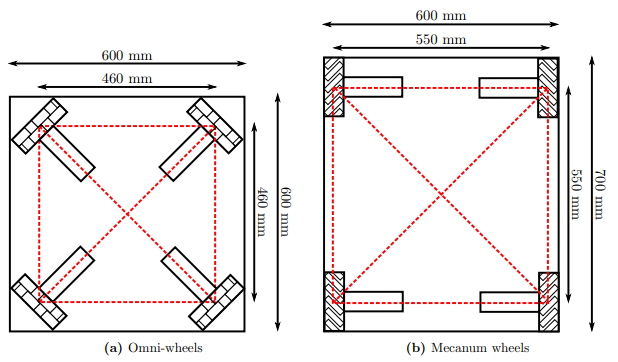
Space efficiency comparison between omni-wheels and mecanum wheels
CAD Design
The base structure uses 4040 aluminum extrusion profiles as the main chassis frame. Motors are mounted with custom-designed motor mounts that adapt the actuator attachment to the extrusion profile geometry.
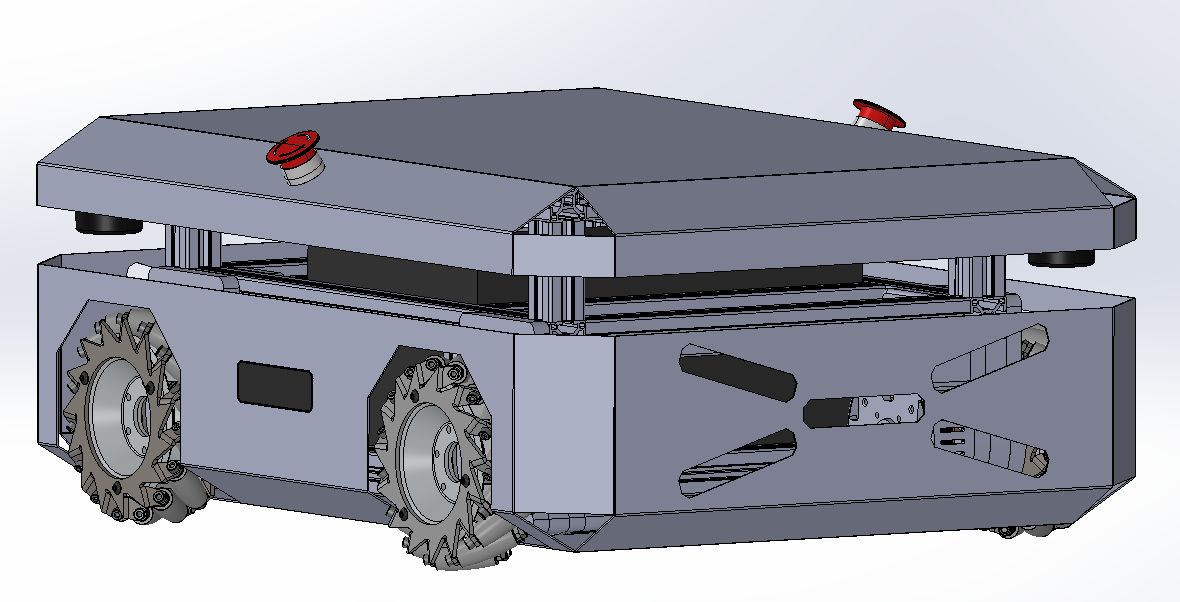
Proof-of-concept CAD model of the omnibase
Actuator System: ODrive S1 + BLDC Motors
Each of the four wheels is driven by an EaglePower LA8308 90KV brushless motor through a 9:1 gearbox, paired with an ODrive S1 motor controller, following a quasi direct drive (QDD) approach inspired by the OpenQDD project.
ODrive S1
The ODrive S1 is a compact, high-performance FOC (Field-Oriented Control) motor controller designed for robotics applications.
| Parameter | Value |
|---|---|
| DC bus voltage range | 12 V – 48 V (12S LiPo max) |
| Continuous phase current | 40 A (with heat spreader) |
| Continuous power output | 1600 W |
| PCB footprint | 66 mm × 50 mm |
| Mass | 35 g (55 g with screw terminals) |
| Communication | CAN (isolated, daisy-chain), UART, USB-C |
| Onboard absolute encoder | Yes — no homing required on startup |
| Control modes | Torque, velocity, position, trajectory |
Key features for this application:
- Galvanically isolated CAN bus with daisy-chain connectors (J16/J17), allowing all 4 S1s to share a single CAN bus to the main controller without ground loop issues.
- Onboard absolute encoder eliminates the need for homing routines when the robot powers on.
- Compact form factor (smaller than a credit card) makes it feasible to mount directly on the base chassis.
The four ODrive S1 units are connected in a CAN daisy-chain, all communicating with the central STM32H755 microcontroller using the CANSimple protocol.
Electronics & Control Architecture
The control PCB is the central hub of the omnibase, designed entirely by the team. It interfaces the main computer with the four motor controllers and onboard sensors.
Control PCB
The schematic was designed in EasyEDA (V1.0) by Ximena Trejo. Full schematic PDF available here.
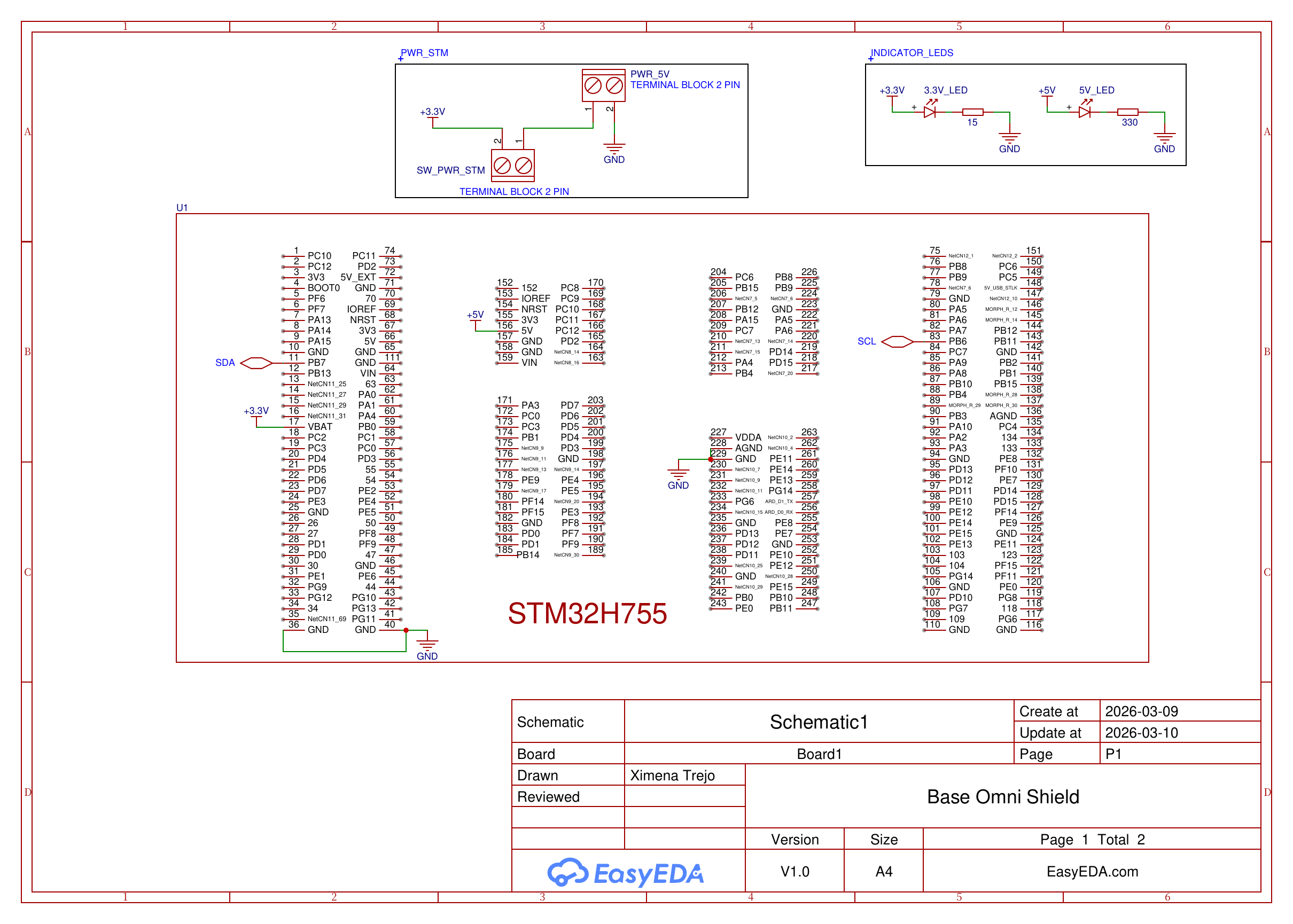
Base Omni Shield Rev 2 — Page 1: STM32H755 pinout
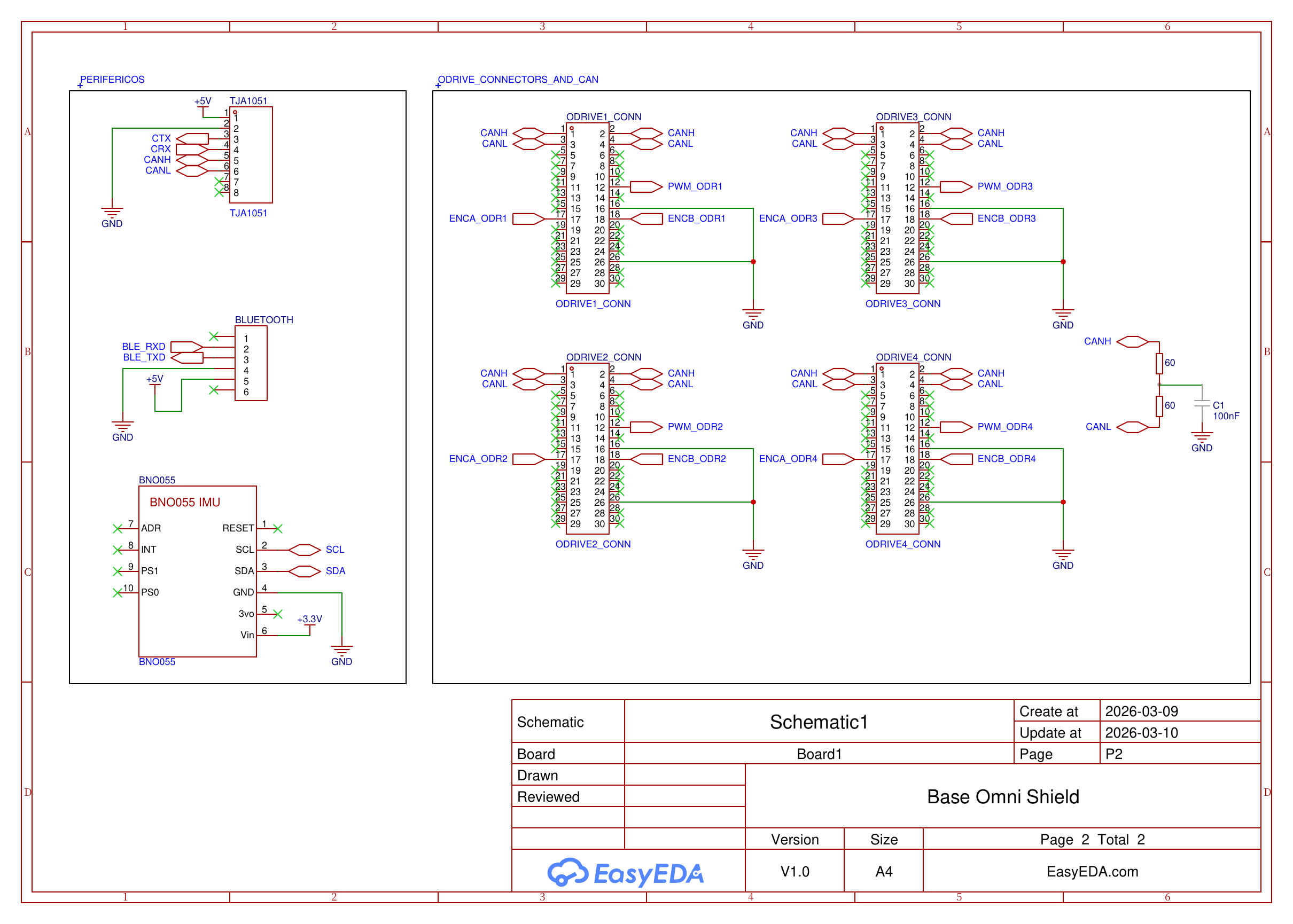
Base Omni Shield Rev 2 — Page 2: TJA1051, BNO055, BLE module and ODrive connectors
Key Components
| Component | Interface | Role |
|---|---|---|
| STM32H755 | — | Dual-core (Cortex-M7 + Cortex-M4) main microcontroller; handles CAN communication, odometry, and BLE |
| BNO085 | I2C (SCL/SDA) | 9-DOF IMU; the firmware reads its game rotation vector (yaw) and gyro z for odometry fusion. The Rev 2 schematic shows the earlier BNO055 on the same bus |
| TJA1051 | CAN (CTX/CRX) | CAN bus transceiver; interfaces the STM32 CAN peripheral with the physical CAN bus to the 4 ODrive S1s; powered at 5V |
| BLE Module | UART (BLE_RXD/BLE_TXD) | Bluetooth Low Energy module for wireless gamepad connectivity; 6-pin connector, powered at 5V |
| ODrive connectors ×4 | 30-pin | Per ODrive: CANH/CANL, PWM, encoder channels A+B (ENCA/ENCB), GND |
| CAN termination | — | 2×60Ω resistors in series (= 120Ω) with 100nF capacitor to GND, per CAN bus standard |
| Power input | Terminal block 2-pin | PWR_5V input with power switch (SW_PWR_STM); 3.3V and 5V indicator LEDs onboard |
Communication Topology
[Main Computer]
      |
    [STM32H755]
      |  (CAN via TJA1051 — CANH/CANL)
      +——[ODrive S1 #1]  ← CANH, CANL, PWM, ENCA, ENCB
      +——[ODrive S1 #2]  ← CANH, CANL, PWM, ENCA, ENCB
      +——[ODrive S1 #3]  ← CANH, CANL, PWM, ENCA, ENCB
      +——[ODrive S1 #4]  ← CANH, CANL, PWM, ENCA, ENCB
                                    [120Ω + 100nF termination]

      + [BNO085]     (I2C — SCL/SDA)
      + [ESP32]      (UART — BLE_RXD/BLE_TXD, Bluetooth gamepad)
The STM32H755 acts as the bridge between the high-level computer (running ROS 2) and the low-level motor controllers. It sends velocity/torque commands over CAN to each ODrive S1; the board also routes PWM and encoder signals (ENCA/ENCB) per motor, but the current firmware commands and reads the ODrives only over CAN. IMU data from the BNO085 is read over I2C for odometry fusion.
The PCB was designed in EasyEDA (V1.0) by Ximena Trejo, created and updated on 2026-03-09/10.
Firmware
The firmware runs on the Cortex-M7 core of the STM32H755 under FreeRTOS. The STM32 is the CAN master: it receives velocity commands, converts them into wheel speeds with mecanum inverse kinematics, sends a setpoint to each ODrive every cycle, and reports odometry and status back to the ROS computer.
| Task | Rate | Role |
|---|---|---|
UART_RX_Task |
~200 Hz | Parses commands from the ROS computer (USART3) |
BT_RX_Task |
~200 Hz | Parses gamepad commands from the ESP32 (USART2) |
ODriveTask |
1 ms loop | Mecanum IK, CAN setpoints, CAN feedback, EKF update, telemetry |
IMU_Task |
~500 Hz poll | Reads the BNO085 over I2C |
UART_TX_Task |
On demand | Sends telemetry (~50 Hz slim / ~10 Hz full) and firmware errors |
On-MCU EKF
Odometry is estimated on the microcontroller by a six-state Extended Kalman Filter, state [x, y, yaw, vx, vy, ω], updated at 50 Hz. It fuses the body-frame wheel velocities with the BNO085 yaw and yaw rate. Mecanum rollers slip during rotation, so the wheel-derived angular velocity is given a very large variance and heading comes from the IMU; IMU yaw jumps above 40° are rejected. The filter replaced robot_localization on the omnibase: the pose estimate exists from boot and keeps running even if the ROS stack restarts.
Safety
- Command watchdog: if no velocity command arrives from ROS or Bluetooth for 500 ms, all four motors are set to zero.
- Hardware e-stop: a normally-closed button on PE2, debounced, with a hold time before re-arming.
- CAN bus-off recovery: the CAN peripheral restarts automatically without rebooting the MCU.
- UART self-healing: overrun errors on both UARTs are cleared and reception is re-armed.
- Error reporting: CAN, ODrive, IMU, watchdog and stack errors are queued and sent to the ROS computer, where the dashboard lists them.
Building and Flashing
The STM32 project is firmware/STM32H7_OMNIBASE_CAN_BNO085 in home-custom-base. Open it in STM32CubeIDE, build the CM7 project and flash it through the board's ST-LINK USB port.
Compile-time switches in the firmware:
IMU_ENABLED: disables the BNO085 task when the IMU is not connected.EKF_TRUST_IMU: set to0to run the EKF on wheel odometry only.
Warning
Power the ODrives (10.5 V to 29 V) before booting the STM32. If the drives are off when the firmware starts, CAN transmission times out.
ROS 2 Interface
On the robot, the base is driven by the odrive_dashboard node of the omnidriver package in home2. It talks to the STM32 over serial (230400 baud), subscribes to cmd_vel, publishes odrive/odom and odrive/imu, broadcasts the odom → base_link transform and serves a web dashboard on port 5000. See Bring-up for the topics and launch commands.
Repository
The firmware, ODrive configuration backups and a standalone version of the dashboard are maintained in:
- GitHub: RoBorregos/home-custom-base
The repository includes:
- STM32 firmware (FreeRTOS tasks, ODrive CAN control, BNO085 driver, EKF)
- odrive_comm ROS 2 package with the standalone dashboard
- ODrive configuration backups and calibration/test scripts (odrive_config/)
Setup
Hardware List
| Component | Part | Notes |
|---|---|---|
| Wheels | 4× mecanum | ~15 cm diameter |
| Motors | 4× EaglePower LA8308 90KV | Brushless, 20 pole pairs, 9:1 gearbox |
| Motor drivers | 4× ODrive S1 | CAN, onboard encoder, 2 Ω brake resistor |
| Main controller | STM32H755 (NUCLEO-H755ZI-Q) | FreeRTOS on the Cortex-M7 core |
| CAN transceiver | TJA1051 | FDCAN1, 500 kbps |
| IMU | BNO085 | I2C1, game rotation vector at 50 Hz |
| Wireless teleop | ESP32 | Bluetooth bridge for a PS5 / DualShock 4 controller |
| Lidars | 2× RPLIDAR C1 | Opposite corners, merged into one 360° /scan |
| Battery | 8× LiFePO4 3.2 V 25 Ah in series + Daly BMS | 25.6 V nominal, 640 Wh; powers the whole robot |
| Emergency stop | Normally-closed button | Wired to PE2 |
| Chassis | 4040 aluminum profiles + MDF covers | 64 × 50 cm footprint with wheels |
Wiring
STM32 Pinout
| Pin | Function | Connected to |
|---|---|---|
| PD0 / PD1 | FDCAN1_RX / FDCAN1_TX | TJA1051 → CAN bus to the 4 ODrives |
| PB6 / PB7 | I2C1_SCL / I2C1_SDA | BNO085 |
| PD5 / PD6 | USART2_TX / USART2_RX | ESP32 (115200 baud) |
| PD8 / PD9 | USART3_TX / USART3_RX | ROS computer through the ST-LINK USB port (230400 baud) |
| PE2 | GPIO input, internal pull-up | E-stop button (NC to GND) |
The ST-LINK USB port shows up on the computer as /dev/ttyACM*. On the Orin, docker/navigation/setup-USB.sh in home2 installs udev rules that create stable names: /dev/ttyOmniSTM32 for the STM32 and /dev/ttyOmniLidar1 / /dev/ttyOmniLidar2 for the lidars.
CAN Bus
The four ODrives are daisy-chained on a single CAN bus (connectors J16/J17 on each S1). Connect CAN_H and CAN_L to the bus, terminate both ends with 120 Ω and tie the CAN ground to the system ground at one point only.
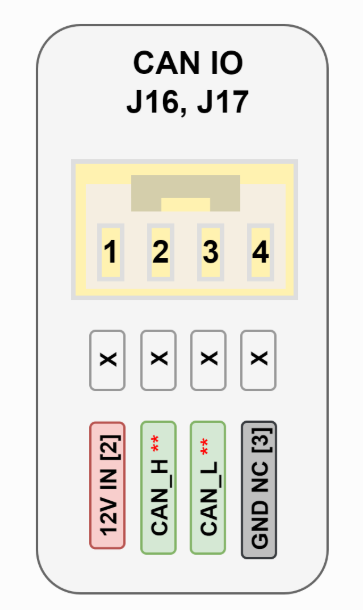
ODrive S1 CAN IO connector (J16, J17). Source: ODrive S1 datasheet
| Wheel | CAN node ID |
|---|---|
| Front-Left | 36 |
| Front-Right | 34 |
| Rear-Left | 33 |
| Rear-Right | 40 |
The node IDs are assigned in the firmware at boot, before CAN reception is enabled.
ODrive Configuration
The ODrives are configured from the ODrive GUI over USB. The current configuration of each drive is backed up in odrive_config/odrive_node<ID>.json in home-custom-base, so a replaced drive can be restored from there.
| Parameter | Value |
|---|---|
| DC bus overvoltage / undervoltage trip | 29 V / 10.5 V |
| DC max positive / negative current | 15 A / −0.01 A |
| Brake resistor | Enabled, 2 Ω |
| Motor | 20 pole pairs, 90 KV |
| Current soft / hard max | 20 A / 23 A |
| Encoder | Onboard |
| Control mode | Velocity control, ramped input (VEL_RAMP) |
| Velocity ramp rate / limit | 40 turns/s² / 25 turns/s |
| CAN | 500 kbps, heartbeat every 100 ms, encoder feedback every 10 ms |
After changing the configuration, run the steps of the GUI's Apply & Calibrate page in order: Erase & Reboot, Apply, Save & Reboot, Run Calibration Sequence, Save & Reboot. Calibration only works with the drive powered from the DC bus and the wheel free to spin.
Single parameters can also be written over CAN from the dashboard's "Advanced param (RxSdo)" box; odrive_config/flat_endpoints.json lists the endpoint IDs for ODrive firmware v0.6.12.
Bring-up
On the Robot (home2)
From the home2 repository on the Orin:
--move runs nav_main/launch/omni_setup/omni_basics.launch.py, which starts the odrive_dashboard node (from the omnidriver package) and the two lidars. The dashboard is the only publisher of the odom → base_link transform: it takes the pose and covariance from the on-MCU EKF, so robot_localization is not launched. For mapping and navigation use ./run.sh navigation --mapping or ./run.sh navigation --gpsr; see the home2 navigation README for the full workflow.
The web dashboard is served at http://<robot-ip>:5000. It shows odometry, IMU, ODrive axis states, the link status of the ESP32 and the ROS computer, and the firmware error log.
Main ROS 2 interface of odrive_dashboard:
| Topic | Type | Direction |
|---|---|---|
cmd_vel |
geometry_msgs/TwistStamped (Nav2) or Twist |
Subscribed |
odrive/odom |
nav_msgs/Odometry (EKF pose, body-frame twist) |
Published |
odrive/imu |
sensor_msgs/Imu (BNO085 yaw and yaw rate) |
Published |
odrive/axis_states, odrive/axis_errors, odrive/bus_voltage |
Diagnostics | Published |
TF odom → base_link |
Published |
Standalone (home-custom-base)
To test the base without the rest of the robot, use the dashboard in home-custom-base:
cd omnibase_ws
colcon build --packages-select odrive_comm
source install/setup.bash
ros2 run odrive_comm odrive_dashboard
The dashboard is then served at http://localhost:5000.
Debugging the CAN Bus with a CANable
A CANable adapter lets a Linux computer listen to the CAN bus directly:
sudo apt install can-utils
ls /dev/ttyACM* /dev/ttyUSB*                 # find the CANable port
sudo slcand -o -c -s6 /dev/ttyACM1 can0      # -s6 = 500 kbps
sudo ip link set up can0 txqueuelen 1000

candump can0                # dump all traffic
cansniffer can0             # live view grouped by ID
canbusload can0@500000      # bus load
More information in the CANable getting started guide.
Troubleshooting
- I2C init errors at boot, or nothing works: usually a FreeRTOS task ran out of stack. Increase the stack size of the task that fails; the firmware also reports stack overflows through its error log.
- An ODrive stays in
INITIALIZING: expected for 1 to 3 seconds after power-up or after changing a parameter such ascurrent_hard_max; longer than that, it cannot be cleared with "clear errors". The only fix found so far is to power everything off, wait a few seconds and power on again. It happened at RoboCup 2026. - Repeated CAN bus-off, axis faults or arm timeouts: check the CAN connectors, the termination resistors and the single CAN ground tie before suspecting the firmware.
- Heading drifts and the IMU looks dead: there is no IMU staleness watchdog yet. If the BNO085 stops sending samples, the EKF silently falls back to wheel-only odometry.
References
- OpenQDD — Open-source Quasi Direct Drive Actuator
- ODrive S1 Datasheet
- H. Taheri, B. Qiao, N. Ghaeminezhad, "Kinematic Model of a Four Mecanum Wheeled Mobile Robot," International Journal of Computer Applications, vol. 113, no. 3, pp. 6–9, 2015. doi:10.5120/19804-1586
- Design Notes & Research Document
- K. Kanjanawanishkul, "Omnidirectional wheeled mobile robots: wheel types and practical applications," International Journal of Advanced Mechatronic Systems, vol. 6, no. 6, p. 289, 2015.
- Mo. Massoud et al., "Mechatronic Design and Path planning optimization for an Omni wheeled mobile robot for indoor applications," ICCTA, 2021.
- ODrive CAN protocol
- STM32H755 datasheet and reference manual RM0399
- K. M. Lynch and F. C. Park, Modern Robotics, ch. 13 (wheeled mobile robots)
- ODrive-STM32-CAN-Driver, base of the firmware's ODrive CAN functions